Writing PONG in TurboC++
Pong Written in C++ #
Welcome to my first C++ Project Pong.This is a remake of the classic video game pong by Atari. For this project, I’m using TurboC++ as my compiler.
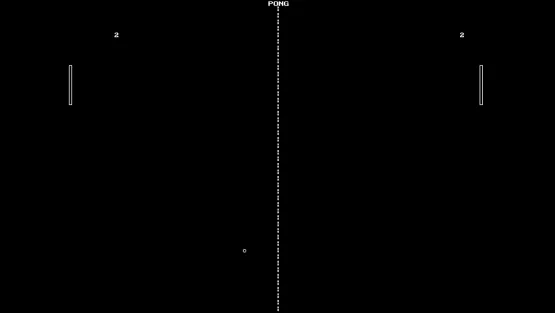
For the source file, check out this for the link
Heads up #
TurboC++ being a really old compiler, so the compiler can only be used to compile 16-bit programs. The .exe file it generates can be run only form DosBox or other emulation softwares
Explanations #
First of all, the main class is defined as follows
class pong
{
 int end;
 int gmode;
 int win_xm;
 int win_ym;
 int l;
 int q;
 int ryl;
 int ryr;
 int lyl;
 int lyr;
 int selection;
 int score[2];
public:
 int playgame;
 int win_x;                  //maximum x value of the screen.
 int win_y;                  //maximum y value of the screen.
 int cx;
 int cy;
 pong();
 void menu();
 void game();
 void conditions();
 void layout();
 void padcollisions();
 void file();
 void pause();
 void about();
 void help();
};
Next up, is the constructor for this class
pong::pong()
{
 playgame=1;
 gmode=0;
 win_xm=317;
 win_ym=238;
 win_x=634;
 win_y=475;
 l=6;
 q=6;
 ryl=100;
 ryr=160;
 lyl=100;
 lyr=160;
 score[0]=-1;
 score[1]=0;
}
Next, Initialize the BGI graphics library with
  int gd=DETECT,gm;
  initgraph(&gd,&gm,"C:\\TURBOC3\\BGI");
Graphics #
Before making the layout for the game, let’s see how to draw simple things in TurboC++. The x value increases form left to right whereas the y value in increases from top to bottom.
For drawing a circle, we call the function circle with three parameters, the x-position of the centre of the circle, y-position of the centre of the circle and the radius of the circle.
circle( xpos,ypos,radius );
For drawing a rectangle, we call the function rectangle with four parameters. The four parameters are the x and y position of the top left corner and the x and y position of the down right corner of the rectangle.
rectangle(xpos1,ypos1,xpos2,ypos2);
For outputting a Siring to a desired location, we use the the function outtextxy().This function take thee parameters, the x position, y position and the string to be printed.
outtextxy(xpos,ypos,”Your Text”);
Making the layout for the game #
void pong::layout()
{
  for(int i=10;i<win_y;i=i+10)  //To make the line at the centre of the screen
  outtextxy(win_xm,i,"|");
  outtextxy(win_xm-11,2,"PONG");
rectangle(0,lyu,4,lyd);         //For drawing the left rectangle
rectangle(630,ryu,634,ryd-30);  //Drawing the right rectangle
  circle(cx,cy,2);              //Drawing the ball
}
lyu and lyd represents the upper and the lower y co-ordinates if the left rectangle. Similarly, ryu and ryd represents the upper and the lower y co-ordinates if the right rectangle.
Moving the objects #
cx and cy represents the x and y position of the Circle.
Now, let’s move the ball such it bounces of the edge. We first assign cy to a random value between 0 and the maximum value of the screen win_y using the random function. cx is assigned as the middle value of the maximum x value of the screen.
cy=random(win_y);
cx=win_xm;  //win_xm=win_x/2
We then move the ball by changing cx and cy using two integers l and q.
cx+=l;
cy+=q;
if(cy >=win_y or cy<=0)  //Detects a horizontal edge.
q=-q;
What this essentially does is that it makes to x position of the circle go undisturbed while we reverse the direction for the y position of the ball. This reduces the cy value by ‘l’ at every increment therefore making the ball bounce off of the edge.
We move the pads (rectangles) by manipulating ypos1 and ypos2 from the rectangle function.
Taking Inputs and manipulating them #
We take the inputs in the variable ‘a’ by using the getch() function.
switch(a)
  {
   case'p':                     //Pause menu
   pause();
   break;

   case 27:                     //27 corresponds to the ASCII value of the ’Esc’ Button
   pause();
   break;

   case 'w':                    //For moving the left pad up
   if(l<0)
   {
    lyu-=7;
    lyd-=7;  }
   break;

   case 's':                    //For moving the left pad down
   if(l<0)
   {
     lyu+=7;
     lyd+=7; }
   break;

   case 'o':                    //For moving the right pad up
   if(l>0)
   {
    ryu-=7;
    ryd-=7; }
    break;


   case 'l':                   //For moving the right pad down
   if(l>0)
   {
    ryu+=7;
    ryd+=7; }
   break;
    }
The conditions #
Next up, we define the conditions
void pong::conditions()
{
  if(cx>=win_x-6)
  if((cy>=ryu)&&(cy<=ryd))            //Detect Collision on right bar
  { l=-l;
    sound(550);
    delay(120);
    nosound();
   }

   if(selection==49)                //Undefeatable AI which maps the y value of the ball
   { ryu=cy-30;                     // to the y value of the pad.
     ryd=ryu+60;
     padcollisions();               //padcollisions detect the collision of the pads with the edge.
                                    //This makes sure that the pads do not go out of the screen.


 padcollisions();

 if(cx<=6)
 if((cy>=lyu)&&(cy<=lyd))           //Detetct Collision on left bar
 { l=-l;
   sound(550);
   delay(140);
   nosound();
 }

 if(score[0]==4)
 { outtextxy(100,200,"player 1 wins");
   delay(1000);
   score[0]=0;
   menu();
 }

 if(score[1]==10)
  { outtextxy(100,200,"player 2 wins");
    delay(1000);
    score[1]=0;
    menu(); }


if((cy>=472)||(cy<=0))             //Bounce Off
q=-q;


if(cx>win_x)
{ score[0]++;
  cx=win_xm;
  cy=random(win_y);
  ryu=100;
  ryd=160;
  lyu=100;
  lyd=160;
  delay(400);
 }

if(cx<0)                          //Death
 { score[1]++;
   cx=win_xm;
   cy=random(win_y);
   ryu=100;
   ryd=160;
   lyu=100;
   lyd=160;
   delay(400);
  }

}
void pong::padcollisions()
{
  if(lyu<=2)        //Detect Edge For Pads
   { lyu+=7;
     lyd+=7;
   }

   if(ryu<=2)
   { ryu+=7;
     ryd+=7;
   }

   if(ryd>=win_y)
   { ryu-=7;
     ryd-=7;
   }

   if(lyd>=win_y)
   { lyu-=7;
     lyd-=7;
   }
}
Menus #
Next, we’re gonna make some Menus
Main Menu #
void pong::menu()
{ int ypos=130;
  char pos;
  char exit;
  while(1)
  {
   cleardevice();
   outtextxy(win_xm-11,2,"PONG");
   outtextxy(100,100,"Enter your selection");
   outtextxy(100,130,"  Singleplayer");
   outtextxy(100,150,"  Multiplayer");
   outtextxy(100,170,"  Help");
   outtextxy(100,190,"  About");
   outtextxy(100,210,"  Exit");
   outtextxy(300,300,"Use The Arrow Keys");
   outtextxy(300,320,"To Navigate Through The Menu");
   pos=getch();

   if(pos==72)     /*FOR MOVING*/
    { ypos-=20;
     if(ypos<120)
       ypos=210; }

   if(pos==80)
    { ypos+=20;
     if(ypos>210)
       ypos=130; }

   if(ypos==130)
   while(!kbhit())
   { rectangle(100,ypos-5,250,ypos+12);
     outtextxy(300,130," Play A Single Player Game"); }

   if(ypos==150)
   while(!kbhit())
   { rectangle(100,ypos-5,250,ypos+12);
     outtextxy(300,150," Play A Multiplayer Game"); }

   if(ypos==170)
   while(!kbhit())
   { rectangle(100,ypos-5,250,ypos+12);
     outtextxy(290,170,"Display Instructions To Play The Game"); }

   if(ypos==190)
   while(!kbhit())
   { rectangle(100,ypos-5,250,ypos+12);
     outtextxy(290,200,"About The Game"); }

   if(ypos==210)
   while(!kbhit())
   { rectangle(100,ypos-5,250,ypos+12);
     outtextxy(290,210,"Exit The Game"); }


    if(pos==13)        //Detect ENTER
    {
    if(ypos==130)
    { selection=49;break;}
    if(ypos==150)
    {selection=50;break;}
    if(ypos==170)
    {selection=51;break;}
    if(ypos==190)
    {selection=52;break;}
    if(ypos==210)
    {selection=53;break;}
    }


   }


  if(selection==49)
  cout<<"\n\nYou Have Selected Single Player";
  if(selection==50)
  cout<<"\n\nYou Have Selceted Multiplayer";
  if(selection==51)
  help();
  if(selection==52)
  about();
  if(selection==53)
  {
   outtextxy(170,270," ~~Thanks For Playing~~");
   delay(1000);
   playgame=0;
  }

}
HELP, ABOUT AND INTRODUCTION
Here I use the file concepts for the help, about and the Introduction. They are stored in separate .txt files.
THE HELP MENU:
void pong::help()
{

 cleardevice();
 char b;
 ifstream obj;                              //obj is an object of class ifstream
 obj.open("help.txt",ios::in);
 cout<<"\n\n\n";
 while(!obj.eof())
 { obj.get(b);
   cout<<b;
   delay(10);
  }
 obj.close();
 getch();
 menu();
}
About Menu #
void pong::about()
{

 cleardevice();
 outtextxy(win_xm,10,"About");
 char b;
 ifstream obj;
 obj.open("about.txt",ios::in);
 cout<<"\n\n\n";
 while(!obj.eof())
 { obj.get(b);
   cout<<b;
   delay(10);
  }
 obj.close();
 getch();
 menu();

}
THE INTRODUCTION:
void pong::file()
{
char temp[300];
ifstream ob;
ob.open("ascii.txt",ios::in);
cout<<"\n\n\n\n\n\n\n\n";
while(!ob.eof())
{
  ob.getline(temp,300);
  cout<<"\t\t";
  puts(temp);
  delay(400);
}
ob.close();

}
Pause Menu #
void pong::pause()
{
  while(1)
  {
   outtextxy(win_xm-300,win_ym,"You Have Paused The Game");
   outtextxy(win_xm-300,win_ym+20,"Press 'p' or 'Esc' To Continue.");
   outtextxy(win_xm-300,win_ym+40,"Press 'Enter' To Go Back To Menu");
   sprintf(str,"%d",score[0]);
   outtextxy(70,50,str);
   sprintf(str,"%d",score[1]);
   outtextxy(600,50,str);
   a=getch();
   delay(10);
   if((a=='p')||(a==27))
   break;
   if(a==13)
   menu();
   break;
   }
}